Forum: DCForumID1
Thread Number: 311
[ Go back to previous page ]
Original Message
"Tricks to VFR pattern landings?"
Posted by RockyJ on 01-25-02 at 00:13z
Hi again.what does everybody do to make the pattern landings more natural. I can'seem to fly the plane and cycle left view to see runway. I bet that's one thing more difficult in the sim from the real one , scanning your field of view. Usually my base to final is pretty wild. Straight ins are pretty easy, and IFR finals also, but the not the turn and land ones.
Phil
Table of contents
- RE: Tricks to VFR pattern landings?,Ben Chiu, 00:48z, 01-25-02
- RE: Tricks to VFR pattern landings?,RockyJ, 05:58z, 01-25-02
- RE: Tricks to VFR pattern landings?,Gunner, 00:57z, 01-26-02
Messages in this discussion
"RE: Tricks to VFR pattern landings?"
Posted by Ben Chiu on 01-25-02 at 00:48z
>Hi again.
>
>what does everybody do to make the pattern landings more
>natural. I can'seem to fly the plane and cycle left view
>to see runway. I bet that's one thing more difficult in
>the sim from the real one , scanning your field of view.
>Usually my base to final is pretty wild. Straight ins are
>pretty easy, and IFR finals also, but the not the turn and
>land ones.
>
>PhilGreetings Phil:
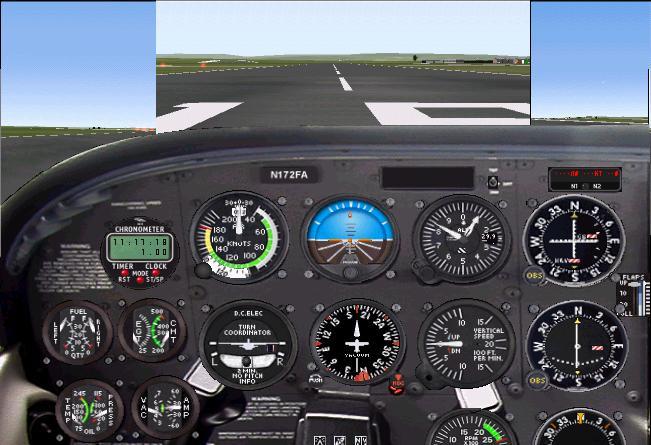
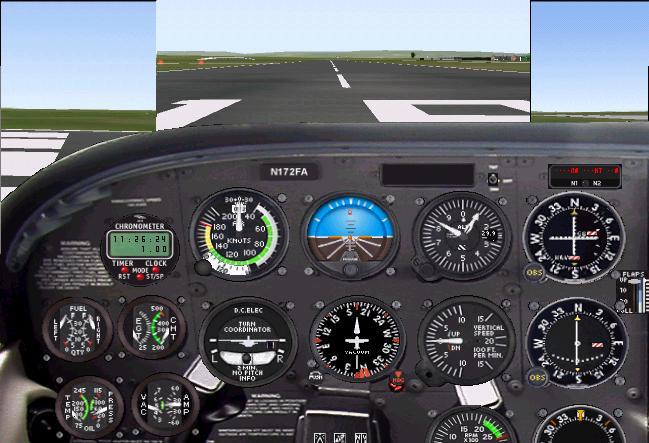
One "solution" that we use is to setup a(n) extra window(s) that have the view you want. You'll need to resize them, but as long as you leave them docked to the main FS window, there's very little performance hit. Here are a couple of examples of some of our default flights for FS2K.
The first uses 45 degree views and the other uses 90 degree views, but of course you can set these extra views to anything you like.
Hope this helps!
Ben
"RE: Tricks to VFR pattern landings?"
Posted by RockyJ on 01-25-02 at 05:58z
Thanks Ben,
I kind of suspected this was done, but I was worried about the performance.I had been making a left window with the < key and moving it aside but it shows the wing and also it isn't 'docked'. I better do some readup on the view workings.[P>Also when I hit the 'W' key to remove the panel the smaller left view would pop up as the main one, the main one closed and I had to reset my orientation (probably cause it was last one opened) But anyway it depends on which one you click into to make active, I believe.
To dock it do you just size the main one smaller and then size the side ones to fit?
thanks for info will do some research and experimenting.
"RE: Tricks to VFR pattern landings?"
Posted by Gunner on 01-26-02 at 00:57z
>what does everybody do to make the pattern landings more
>natural. I can'seem to fly the plane and cycle left view
>to see runwayHi Phil!
I struggled with the "view" problem for a long while, it really diminished my enjoyment of FS in the early days. The soluton Ben suggests is a great one. With the DOS versions we didn't have that option and I just didn't like having to reach down to the NUM PAD to punch in the side views but eventually got used to it. It did interfere with my "suspension of dis-belief" though. My real "break-through" came with the first joystick I got with a Point-of-View (POV) "hat". Even though in those early days we were limited to 4 views (front, both sides, and rear) it made a difference. Today you can easily get the 45^ views in each direction as well as the others. If a POV joystick/yoke is out of the question you might consider getting a marco editor and making some macros for the views that would give you a 45^ view, pause for a couple of seconds, then return you to the straight ahead view. It's been a few years since I did anything with a macro editor but there were some good free-ware editors avialable. If you try this, please remember to pick a key combination you can (a) reach easily with one hand (b) doesn't conflict with key combinations you need for the sim.
Have Fun! (tm)
-= Gunner =-Written by Mike Thompson in Jacksonville, Florida